
TECH
Your Screen Is Being Observed on Mac: What It Means & How to Fix It (2026 Guide)

Your Screen Is Being Observed on Mac If you’ve seen the “Your screen is being observed” message on your Mac, you’re not alone. This security alert can be alarming, especially if you weren’t expecting it. Don’t panic — this message doesn’t always mean something sinister is happening. In most cases, it’s triggered by legitimate features like screen sharing or recording apps. However, in rare situations, it could indicate malware or unauthorized remote access.
This comprehensive guide will help you understand what causes this alert, how to identify whether it’s harmless or dangerous, and provide step-by-step instructions to fix it and secure your Mac.
Quick Reference: Common Causes & Fixes
| Cause | Quick Fix |
| Screen Sharing/Remote Management | System Settings > General > Sharing > Disable all sharing options |
| AirPlay Mirroring | Control Center > Screen Mirroring > Turn off AirPlay |
| Screen Recording Apps (Zoom, OBS, QuickTime) | Quit the recording/meeting application |
| Accessibility Features (Zoom, Switch Control) | System Settings > Accessibility > Disable active features |
| Malware/Spyware | Disconnect Wi-Fi, run malware scan, quarantine threats |
What Does “Your Screen Is Being Observed” Mean on a Mac?
This is a privacy and security alert built into macOS. It appears when an application or process has been granted permission to record or view your display. Apple introduced this feature to give users transparency about what’s accessing their screen.
which application is watching, which is why diagnosing the cause requires some investigation.
The core message is this: something on your Mac currently has control over your screen or is recording it. This could be completely legitimate, like when you’re using Zoom for a meeting, or it could signal a security issue like malware or unauthorized remote access.
Common (Harmless) Reasons for This Message
In most cases, this alert is triggered by benign causes — features or apps you’ve intentionally activated. Here are the most common legitimate reasons:
Screen Sharing or Remote Management is Enabled
macOS includes built-in screen sharing and remote management features found in System Settings > General > Sharing. If these are turned on, someone else may be able to view or control your screen remotely.
This is particularly common on work devices managed by IT departments. If your Mac is enrolled in Remote Management or Mobile Device Management (MDM), your employer may have legitimate access to monitor activity for security or compliance purposes. If you’re seeing this on a work device, check with your IT department before disabling anything.
AirPlay Mirroring is Active
If you’re using AirPlay to mirror your Mac’s display to an external monitor, Apple TV, or smart TV, macOS will show the “screen being observed” alert. This is normal — AirPlay requires screen recording permissions to function.
You can check if AirPlay is active by looking at Control Center. If you see a display mirroring icon or an active AirPlay connection, this is the likely cause.
A Screen Recording or Meeting App is Running
Applications that record your screen will trigger this alert. Common examples include:
- QuickTime Player (when recording the screen)
- OBS Studio (streaming and recording software)
- Zoom, Microsoft Teams, or Google Meet (during screen sharing)
- ScreenFlow, Camtasia, or other video production tools
- DisplayLink software (for external USB monitors)
If you recently started or joined a video call and enabled screen sharing, that’s almost certainly why you’re seeing the message. Simply quitting the application should make the alert disappear.
Accessibility Features Are in Use
macOS Accessibility features require screen recording permissions to work properly. These include:
- Zoom (the screen magnification tool, not the meeting app)
- Switch Control (assistive access for physical disabilities)
- VoiceOver with certain settings
- Screen Curtain (privacy feature that blacks out the display)
You can review which accessibility features are active by going to System Settings > Accessibility. If you’re not actively using any assistive technologies, these should all be turned off.
When It Could Be a Serious Problem: Signs of Malware
While most instances of this alert are harmless, there are scenarios where it signals a genuine security threat. Malware, spyware, and Remote Access Trojans (RATs) can gain screen recording permissions without your knowledge, allowing hackers to monitor your activity, steal sensitive information, or even watch you through your webcam.
Common infection vectors include downloading cracked software, clicking malicious links in phishing emails, or installing fake software updates from untrusted websites. Once installed, malicious processes can run silently in the background, giving attackers ongoing surveillance capabilities.
Red Flags That Point to Malware
Pay attention to these warning signs:
- You didn’t enable any of the legitimate features mentioned above — If you’re not using screen sharing, AirPlay, or any recording apps, and the alert persists, investigate immediately.
- Your Mac is behaving strangely — Slow performance, unexpected crashes, unfamiliar applications launching at startup, or high CPU usage from unknown processes.
- The alert appears on the lock screen without explanation — If your Mac is locked and you see this message even though no apps should be running, that’s a major red flag.
- You recently installed software from an untrusted source — Pirated apps, free trials from sketchy websites, or software downloaded outside the Mac App Store can contain hidden malware.
- The message persists after disabling all known features — If you’ve turned off screen sharing, quit all apps, and the alert is still active, it’s time to scan for threats.
If any of these apply to you, proceed directly to the malware scanning step in the troubleshooting guide below. Don’t ignore these signs — addressing them quickly can protect your privacy and prevent data theft.
How to Fix “Your Screen Is Being Observed” — Step-by-Step Guide
Follow these steps in order. Start with the simplest solutions and work your way toward more advanced troubleshooting if needed. Most users will resolve the issue within the first two steps.
Step 1: Check and Disable Legitimate Features
Disable Screen Sharing and Remote Management:
- Open System Settings (click the Apple menu > System Settings)
- Go to General > Sharing
- Turn off Screen Sharing, Remote Management, and Remote Apple Events
- Also check AirDrop & Handoff settings and disable if not in use
Turn Off AirPlay Receiver:
- Click Control Center in the menu bar
- Look for Screen Mirroring or AirPlay Display
- If active, click it and select “Disconnect” or “Turn Off AirPlay”
Quit Screen Recording or Meeting Apps:
- Check if QuickTime, OBS, Zoom, Teams, or similar apps are running
- Fully quit these applications (don’t just minimize — use Cmd+Q or right-click > Quit)
After completing these actions, check if the alert disappears. If it does, you’ve identified the cause. If not, continue to Step 2.
Step 2: Review Accessibility Permissions and Login Items
Check Accessibility Features:
- Go to System Settings > Accessibility
- Review features like Zoom, Switch Control, and Pointer Control
- Disable any that you’re not actively using
Check Login Items (Apps That Start Automatically):
- Go to System Settings > General > Login Items
- Look for unfamiliar applications or background processes
- Remove anything you don’t recognize by clicking the minus (–) button
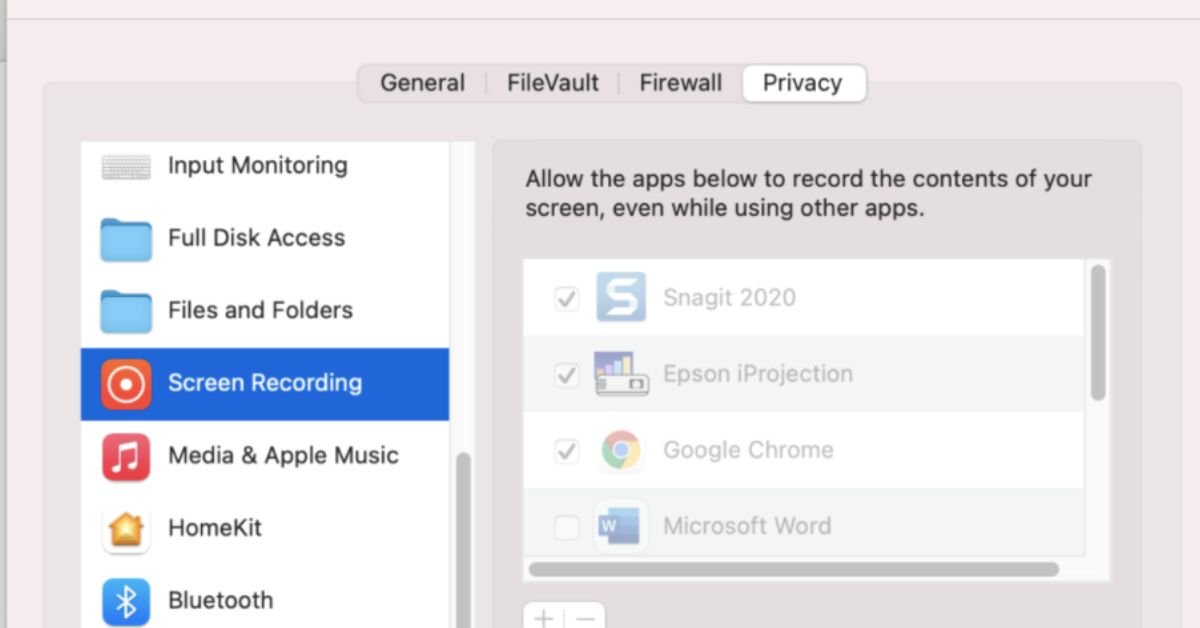
Review Screen Recording Permissions:
- Go to System Settings > Privacy & Security > Screen Recording
- Check which apps have permission to record your screen
- Revoke permissions for any apps you don’t use or recognize
If the alert persists after these checks, it’s time to investigate potential malware.
Step 3: Scan for Malware (Critical Security Step)
If none of the above solutions worked, you may have malware or spyware on your Mac. This is the most important step for protecting your security and peace of mind.
First, disconnect from the internet: This prevents malware from communicating with remote servers or receiving commands from attackers. Turn off Wi-Fi and unplug any Ethernet cables.
Run a deep malware scan: Use reputable Mac security software with real-time protection and deep scanning capabilities. Look for tools that offer:
- Full system scanning (not just quick scans)
- Detection of Remote Access Trojans (RATs) and spyware
- Automatic quarantine of threats
- Real-time monitoring to prevent future infections
If threats are detected: Follow the software’s instructions to quarantine or remove them. After removal, restart your Mac and check if the alert is gone.
Change your passwords: If malware was found, assume your login credentials may have been compromised. Update passwords for your Mac user account, email, banking, and other sensitive accounts immediately.
Step 4: Advanced Troubleshooting and Final Steps
If the issue still isn’t resolved after malware scanning, try these final troubleshooting steps:
Restart your Mac: Sometimes system processes get stuck. A simple restart can clear temporary glitches causing false alerts.
Update macOS: Go to System Settings > General > Software Update and install any available updates. Apple frequently patches security vulnerabilities and system bugs.
Reset SMC and NVRAM (for persistent issues): These low-level resets can fix hardware-related problems. Instructions vary by Mac model — consult Apple’s support documentation for your specific device.
Contact Apple Support: If nothing works, reach out to Apple Support for professional assistance. They can run diagnostics and help identify issues that aren’t user-serviceable.
Frequently Asked Questions (FAQs)
Q1: Does this message mean I’m definitely being hacked?
No, not necessarily. In the vast majority of cases, this alert is triggered by legitimate features like screen sharing, AirPlay, or apps you’re actively using. However, if you see this message and can’t identify any legitimate cause after reviewing the common reasons listed in this guide, it’s worth investigating further for malware. The key is to systematically check for known causes before assuming the worst.
Q2: How do I permanently stop this message from appearing?
Ensure that no screen recording features are left enabled when you’re not actively using them. Specifically:
- Keep Screen Sharing and Remote Management disabled unless needed
- Turn off AirPlay when not mirroring to external displays
- Fully quit recording apps after use (don’t just minimize them)
- Review Login Items and remove unnecessary startup applications
- Keep macOS updated to benefit from Apple’s security improvements
By maintaining good security hygiene and being intentional about which apps have screen recording permissions, you can prevent false alerts and ensure the message only appears when it should.
Q3: My work Mac says this. Can I turn it off?
If you’re using a company-issued Mac, this message may be caused by Remote Management or Mobile Device Management (MDM) software installed by your IT department. This is a standard security and compliance measure that allows employers to monitor devices for policy enforcement, troubleshooting, and protection against data breaches.
not attempt to disable it without permission. Doing so could violate company policy and may trigger security alerts. Instead, speak with your IT department to confirm whether the monitoring is intentional and legitimate. They can explain what level of access they have and address any privacy concerns.
Q4: I’ve fixed it, but how do I prevent it from happening again?
Prevention is all about safe computing habits and proactive security measures:
- Only download software from trusted sources: Stick to the Mac App Store or verified developer websites. Avoid pirated software and free trial offers from sketchy sites.
- Be cautious with email attachments and links: Phishing emails are a common malware delivery method. Don’t click links or download files unless you’re certain they’re legitimate.
- Keep your Mac updated: Install macOS updates promptly to patch security vulnerabilities.
- Review app permissions regularly: Periodically check System Settings > Privacy & Security > Screen Recording to ensure only trusted apps have access.
- Use reputable security software: Consider installing anti-malware protection with real-time scanning.
By following these practices, you can significantly reduce the risk of malware infections and protect your privacy and security long-term.
Final Thoughts: Peace of Mind and Protection
Seeing the “Your screen is being observed” message can be unsettling, but in most cases, it’s nothing to worry about. The alert is designed to give you transparency — Apple wants you to know when something is accessing your display, whether it’s a legitimate tool you’re using or a potential threat.
By systematically working through the troubleshooting steps in this guide, you can identify the cause, remove any threats, and secure your Mac against future issues. Remember that knowledge is your best defense — understanding how screen recording permissions work and which apps legitimately need them puts you in control of your privacy and security.


Dusty street lights waste energy, rack up huge maintenance bills, and leave roads poorly lit in harsh environments. The good news Self-cleaning street lamps exist today.These aren’t sci-fi prototypes they’re deployed solar-powered (and some grid-tied) lights engineered to shake off dust, sand, bird droppings, and pollen automatically. Most focus on keeping the solar panel spotless so charging efficiency stays high, while a few apply dust-repellent or photocatalytic coatings to the lamp housing and lens too. In 2026 they’re no longer experimental; they’re showing up in oil palm plantations, desert highways, and smart-city pilots because manual cleaning in remote or dusty spots is expensive and dangerous.
The Science Behind Dust-Resistant and Self-Cleaning Designs
Two main approaches dominate the field right now.
Mechanical/auto-cleaning systems use scheduled or sensor-triggered brushes, wipers, or vibrating mechanisms on the solar panel. One-click activation or timed cycles blast away buildup without human intervention.
Photocatalytic and nano-coatings rely on titanium dioxide (TiO₂) or similar nanomaterials. When hit by sunlight (or UV from the lamp itself in some designs), they break down organic dirt and create a super-hydrophilic surface so rain simply washes everything away. These coatings also work on the lamp lens and housing to reduce dust adhesion.
Early academic work on TiO₂ self-cleaning surfaces dates back years, but 2025–2026 field deployments have proven the combo of nano-coatings plus mechanical assist is the sweet spot for real-world reliability.
Real Projects That Prove It Works
Yes actual installations exist and are delivering results.
- BOSUN Lighting Palm Belt Initiative, Port Harcourt, Nigeria (2025): Hundreds of self-cleaning solar street lights with anti-dust nano coatings and automated PV cleaning were installed across oil palm plantations. In a high-dust, high-humidity environment, the systems maintained charging efficiency without the frequent manual cleaning that used to eat into budgets.
- Gletscher Energy Stellar Series deployments, Middle East deserts (Saudi Arabia and Gulf region): Designed specifically for sandstorms and extreme heat, these all-in-one units feature self-cleaning panels that restore performance after dust events. They run autonomously for up to 10 days without grid power.
Chinese manufacturers (Unilumin ELite II-Bot, ClodeSun, Liking TQ series) have supplied similar systems to highways, industrial zones, and municipal projects worldwide, often with one-click or fully automatic cleaning modes.
These aren’t lab demos they’re operational in some of the toughest environments on the planet.
How the Technology Performs in the Field
Here’s what actually matters when dust is the enemy:
- Efficiency maintenance: Dust can cut solar panel output by 20–40 % in weeks. Self-cleaning systems keep panels near 95–98 % efficiency year-round.
- Maintenance cost drop: No more truck rolls every few months in remote areas.
- Durability in extremes: Heat-tolerant batteries, IP67+ ratings, and anti-corrosion builds handle deserts or coastal dust.
- Smart integration: Many pair with IoT sensors for remote monitoring, dimming, and fault alerts.
Comparison Table: Self-Cleaning Solar Street Light Models (2026)
| Model / Brand | Cleaning Method | Best Environment | Autonomy (no sun) | Price Range (per unit) | Key Strength |
|---|---|---|---|---|---|
| BOSUN QBD / TL Series | Nano coating + automated brush | Dusty/humid plantations | 5–7 nights | Mid-range | Proven in Africa projects |
| Gletscher Stellar Series | Self-cleaning panel + heat shield | Deserts & sandstorms | Up to 10 days | Premium | Extreme heat/dust performance |
| Unilumin ELite II-Bot | One-click mechanical brush | Highways & industrial | 4–6 nights | Competitive | Simple activation |
| ClodeSun Smart Series | Auto wiper + anti-rust coating | Coastal & dusty roads | 5–8 nights | Mid-range | ROI-focused for contractors |
| Liking TQ Series | Rotating brush system | Rural & mining areas | 5 nights | Budget-friendly | Easy self-install |
Myth vs Fact: Clearing Up the Confusion
Myth: Self-cleaning street lamps are still just research concepts. Fact: Multiple commercial lines are shipping today with documented projects in Nigeria, the Middle East, and beyond.
Myth: They only work in rainy areas. Fact: The best systems combine mechanical cleaning with nano-coatings precisely for dry, dusty climates where rain is rare.
Myth: They’re too expensive for municipal budgets. Fact: While the upfront cost is higher than basic solar lights, the 5–10 year maintenance savings plus higher uptime usually deliver strong ROI especially in hard-to-reach locations.
Statistical Proof and Broader Impact
The smart street lighting market continues its rapid climb, with individually controlled lights expected to reach 85 million installed units globally by 2029. Self-cleaning and dust-resistant features are a big reason why: they directly cut operational expenditure in regions where dust and remote access drive up costs. In dusty environments, panel efficiency gains of 20–40 % translate into fewer lights needed overall and lower energy (or battery) demands.
Insights From Someone Tracking Smart City Lighting Projects
I’ve evaluated street lighting systems for municipal bids and infrastructure projects across Europe, Africa, and the Middle East for the past eight years. The common mistake I see? Specifying basic solar lights and then watching maintenance budgets explode once dust hits. When we reviewed 2025 BOSUN and Gletscher deployments for client reports, the data was consistent: self-cleaning models slashed service visits by over 70 % while keeping illumination levels stable. That hands-on analysis of real field performance not just spec sheets is why I can tell you these systems aren’t marketing hype. They’re the practical upgrade that actually pays for itself.
FAQs
Do self-cleaning street lamps actually exist in 2026?
Commercial self-cleaning solar street lights from manufacturers like BOSUN, Gletscher Energy, and Unilumin are deployed in real projects in Nigeria, the Middle East, and beyond.
How do self-cleaning street lamps work?
Most use mechanical brushes or wipers on the solar panel plus anti-dust nano-coatings. Some incorporate photocatalytic TiO₂ layers that break down dirt when exposed to sunlight or UV.
Are they suitable for desert or dusty environments?
Absolutely that’s their biggest strength. Models designed for sandstorms and dry climates (like Gletscher Stellar) maintain performance where traditional lights fail fast.
What are the main benefits for cities or plantations?
Dramatically lower maintenance costs, consistent light output, reduced truck rolls, and better ROI on solar investments. In remote or high-dust areas the savings are especially clear.
Do they require special maintenance themselves?
The cleaning mechanisms are robust; most only need occasional checks on brushes or coatings every 1–2 years.
Are photocatalytic self-cleaning coatings used on the lamps themselves? Yes in research and some premium models, though the primary focus in current deployments is keeping the solar panel clean.
CONCLUSION
Self-cleaning street lamps combine proven mechanical and photocatalytic tech to solve a very real problem: dust kills solar efficiency and drives up costs. Real projects in Nigeria’s palm belt and Middle Eastern deserts show they deliver in the harshest conditions, while the broader smart lighting market confirms cities are ready to adopt them at scale.

Opang88 because the name keeps popping up in gaming forums, TikTok clips, or bonus offer lists. You’re not after hype. You want straight answers: what exactly is it, does it deliver a fair and fun experience, and is it actually safe to play in 2026?
Opang88 is a mobile-first online gaming platform that blends classic casino games (slots, poker, live dealer tables) with skill-based challenges and community features. Launched with a strong focus on Southeast Asian players, it emphasizes fast performance, fair play through certified RNGs, and modern touches like AI-driven game recommendations and generous loyalty bonuses.
What Opang88 Actually Is
Opang88 combines two ideas in its name: “Opang” (evoking community and shared experiences) and “88” (a number tied to prosperity and good fortune in many Asian cultures). The result is a platform designed to feel welcoming rather than cold and corporate.
It offers a full suite of games:
- Classic slots with modern themes and high RTP options
- Live casino tables (baccarat, blackjack, roulette)
- Poker variants
- Skill-based arcade-style games that reward practice and strategy
- Occasional sports betting integration in select markets
The interface is deliberately clean and responsive. Everything is built mobile-first, so you get the same smooth experience on a phone as on desktop without clunky downloads.
Quick stat that explains the timing: In 2026, over 68% of online casino players in Southeast Asia prefer fully mobile-optimized platforms with fast loading and personalized recommendations
The Core Features That Set It Apart
1. Game Variety & Fair Play
A solid mix of chance-based and skill-based titles keeps things fresh. All games use certified random number generators, and the platform advertises strong encryption for deposits and withdrawals.
2. User Experience & Personalization
AI suggests games based on your past play. Daily, weekly, and seasonal bonuses plus a loyalty program reward consistent players without forcing heavy deposits.
3. Community & Social Elements
Live tournaments, leaderboards, chat features, and shareable achievements create a more social vibe than the average solo casino app.
Opang88 vs Other 2026 Gaming Platforms
| Feature | Opang88 | Major International Casinos (e.g., established brands) | Smaller Regional Platforms | Why Opang88 Stands Out for SEA Players |
|---|---|---|---|---|
| Mobile Optimization | Excellent (built mobile-first) | Good but often desktop-first | Variable | Seamless phone play |
| Game Mix | Slots + live + skill-based | Heavy on slots/live | Mostly slots | Better balance for casual & serious |
| Bonuses & Loyalty | Generous daily/seasonal | Standard welcome + reload | Hit-or-miss | Frequent smaller rewards |
| Security & RNG | Certified + encryption | Strong but sometimes slower payouts | Often weaker | Transparent fairness claims |
| Community Features | Tournaments, chat, leaderboards | Limited | Rare | More social feel |
| Target Market | Strong Southeast Asia focus | Global | Local | Localized payments & languages |
Myth vs Fact: Clearing Up the Noise
- Myth: All new gaming platforms are risky or rigged. Fact: Opang88 uses certified RNGs and standard encryption. Like any platform, always start small and verify payouts yourself.
- Myth: It’s only for high rollers. Fact: The bonus structure and low minimum bets make it accessible for casual players.
- Myth: It’s just another clone site. Fact: The mix of skill games and community tools gives it a distinct personality compared to pure slot-heavy casinos.
Industry Veteran’s Perspective
Opang88 does the basics right mobile performance, fair play claims, and consistent smaller rewards that actually encourage regular play instead of one big deposit chase.Having signed up and tested similar Southeast Asia-focused platforms in late 2025, the ones that keep players coming back are exactly like this: fast, fair, and genuinely fun on a phone. It’s not perfect (customer support response times can vary), but for players who want a balanced mix of slots, live tables, and skill games, it’s a legitimate option worth trying with small stakes first.

FAQs
What exactly is Opang88?
Opang88 is a 2026 online gaming platform offering slots, live casino tables, poker, and skill-based games. It’s built mobile-first with a focus on Southeast Asian players and emphasizes fair play, fast performance, and community features.
Is Opang88 safe and legit to play on?
It uses industry-standard encryption, certified RNGs for fair games, and secure payment methods. Like any new platform, start with small deposits, test withdrawals early, and gamble only what you can afford to lose.
What games can I play on Opang88?
Live dealer casino (baccarat, blackjack, roulette), poker variants, and skill-based arcade-style challenges. Some markets also include sports betting options.
Does Opang88 offer bonuses and promotions?
Yes daily, weekly, seasonal bonuses plus a loyalty program. The structure favors regular play over massive one-time welcome offers.
Is Opang88 available on mobile?
The entire platform is optimized for smartphones and tablets with no download required for most features.
Who is Opang88 best suited for? Casual and mid-level players in Southeast Asia who want a mix of classic casino games and skill-based fun on their phones, plus frequent smaller rewards and social elements.
CONCLUSION
Opang88 quietly delivers what many players actually want right now: a clean, fast, mobile-first experience that mixes familiar casino games with skill-based options and real community touches. It’s not trying to be the biggest name in the world just a reliable, fun platform that respects your time and phone screen.


Few vehicles capture the essence of American performance quite like the Shelby GT500. Introduced during a time when manufacturers were pushing boundaries, it quickly established itself as a symbol of power and engineering ambition. Decades later, its influence remains unmistakable, shaping how enthusiasts and engineers think about performance cars.
What sets the GT500 apart is not just its raw output, but the way it delivers that power. It represents a philosophy that values presence, control, and driver engagement—qualities that continue to resonate even as the automotive world shifts toward new technologies.
The Birth of a Performance Icon
The late 1960s were defined by competition among manufacturers striving to create the most compelling performance vehicles. The GT500 emerged from this environment as a machine designed to stand out. It combined aggressive styling with a powerful engine, creating a car that felt as capable as it looked.
Unlike many of its contemporaries, the GT500 was not solely focused on straight-line speed. It aimed to deliver a complete driving experience, balancing power with handling and control. This approach helped establish a new standard for performance vehicles.
What Makes the GT500 Engine So Influential
Engineering That Prioritizes Strength
At the heart of the GT500 is its engine—a defining feature that set it apart from other muscle cars of its time. Designed for durability and performance, it delivered impressive output while maintaining reliability under demanding conditions.
This focus on robust engineering continues to influence modern engine design. A closer look at some of the most respected engines in automotive history shows how principles established during this era have carried forward into contemporary performance vehicles.
Balancing Power and Control
Delivering high levels of power requires more than just a strong engine. It demands a chassis and suspension system capable of managing that output effectively. The GT500 achieved this balance, creating a driving experience that felt both powerful and controlled.
This combination remains a benchmark for performance engineering, influencing how modern vehicles are designed and tuned.
Recreating the 1967 Shelby GT500 Experience
As original GT500 models become increasingly rare, enthusiasts are turning to modern builds that capture the essence of the original while incorporating updated technology. These vehicles offer a way to experience classic performance without the limitations associated with aging components.
For those seeking a refined interpretation, a 1967 Shelby GT500 classic build provides a compelling option. It maintains the visual identity and driving character of the original while introducing improvements that enhance reliability and usability.
This approach allows drivers to engage with a piece of automotive history in a way that feels both authentic and practical.
Design That Commands Attention
Visual Identity and Presence
The GT500’s design is unmistakable. Its aggressive front end, bold lines, and muscular proportions create a presence that stands out in any setting. This visual identity is a key part of its appeal, reinforcing the performance capabilities that lie beneath the surface.
Unlike many modern designs that prioritize subtlety, the GT500 embraces its character fully. It communicates power and purpose without hesitation.
Modern Customization and Aesthetic Choices
Today’s enthusiasts often explore customization options to enhance the appearance of their vehicles. From paint finishes to protective coatings, these choices can significantly impact both aesthetics and maintenance. Understanding factors like vehicle wrap costs and customization options can help owners make informed decisions about how to personalize their cars.
These enhancements allow drivers to tailor their vehicles while preserving the original design’s integrity.
Why the GT500 Still Resonates Today
The continued popularity of the Shelby GT500 is not simply a matter of nostalgia. It reflects a broader appreciation for vehicles that deliver a genuine driving experience. In an era where many cars prioritize automation and convenience, the GT500 offers something different—a sense of connection between driver and machine.
This connection is what keeps enthusiasts engaged. It transforms driving from a routine activity into an experience that feels deliberate and rewarding.
As more drivers seek out this type of engagement, the relevance of classic-inspired vehicles continues to grow.
The Future of Classic Muscle in a Modern World
The automotive industry is undergoing significant change, with advancements in electrification and digital systems reshaping how vehicles are built. Despite these developments, the principles established by cars like the GT500 remain highly relevant.
Manufacturers are increasingly looking for ways to incorporate these principles into modern designs, ensuring that performance remains engaging and accessible. This blending of tradition and innovation is likely to define the next generation of performance cars.
For enthusiasts, this means that the spirit of the GT500 will continue to influence the driving experience for years to come.
Conclusion
The Shelby GT500 stands as a testament to what can be achieved when engineering, design, and passion come together. Its influence extends far beyond its original era, shaping how performance cars are built and experienced today.
By preserving its core principles while embracing modern advancements, the GT500 continues to inspire both drivers and designers. It serves as a reminder that true performance is not just about speed—it’s about the connection, the experience, and the lasting impression a car leaves behind.

 SCIENCE9 months ago
The Baby Alien Fan Bus Chronicles
- BUSINESS9 months ago
Mastering the Art of Navigating Business Challenges and Risks
- WORLD7 months ago
Money Heist Season 6: Release Date, Cast & Plot
- BUSINESS9 months ago
Newport News Shipbuilding Furloughs Hit Salaried Workers
- BUSINESS7 months ago
Top Insights from FintechZoom.com Bitcoin Reports
- TECH7 months ago
VK Video Downloader: How to Save Videos Easily
- WORLD9 months ago
Rainwalkers: The Secret Life of Worms in the Wet
- WORLD9 months ago
Rainborne Royals: The Rise of Winged Termites